Then just press on delete bouton on your keyboard.
Installation of Windows xp pro
What does the letters XP mean?
It stands for EXPERIENCE. And, Windows XP is a good MS OS and have nice interface.
What about installation of Windows XP?
Well, it is the same for Windows 2000 pro or Windows xp home edition.
What are the system requirement for installing Windows xp?
Microsoft's system requirement to install windows xp home edition or windows xp pro
· PC with 300 megahertz (MHz) or higher processor clock speed recommended; 233-MHz minimum required;* Intel Pentium/Celeron family, AMD K6/Athlon/Duron family, or compatible processor recommended
· 128 megabytes (MB) of RAM or higher recommended (64 MB minimum supported; may limit performance and some features)
· 1.5 gigabyte (GB) of available hard disk space.
· Super VGA (800 × 600) or higher resolution video adapter and monitor
· CD-ROM or DVD drive
· Keyboard and Microsoft Mouse or compatible pointing device
my advice to you all:
· if you can 1 gig (MHZ) CPU will do a magnificient job ( if you are a gamer, you should get an AMD CPU, others should get an INTEL CPU )
· 256 megabytes (MB) minimum to have a smoother performance
· unless you are broken, a hard drive of 20 gig is the standard
· anything else should have less impact on your system's performance ( for other people with an appetit for movie and gaming. It is recommanded to have at lease a geforce II mx 420 or ati radeon 7500 or better and also at lease a sound blaster)
· additionnal feature: an optical mouse, a dvd drive and a cd-rw drive should be taken in consideration serioustly
If you have an optical mouse, you can avoid to clean the little ball inside your wheel mouse. With a dvd drive,
what else can you ask for to watch a dvd movie on your PC ? Finally, a cd-rw drive is just a thing, no PC's
owner should forget ( backup your data, copy musics and movie ) oh games too i almost forgot.
· Want it or not, you have to buy a monitor, to have a best view and low cost. You should get a viewsonic 17'inch minimum.
Let's start the installation.
First of all, plz DO NOT take your Windows XP CD out of the CD-ROM DRIVE unless i tell you all to. That's it all for now.:)
Now, put the power on for your monitor and your box.
1th
|
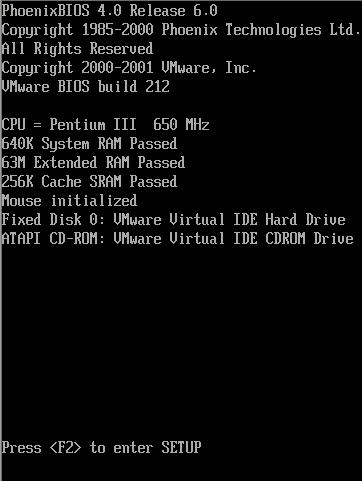
You all will see a similar screen to this one.
Then just press on delete bouton on your keyboard. |
You will be in Bios menu, a similar screen to this one. Then, you should change the boot sequence to CD-ROM drive (to be the first one to be used as boot drive). And also at same time put your Windows XP cd in your CD-ROM drive. Once you are done save your configuration, your system will restart.
2th
 |
if you have done everything right as i said above. you will see this screen.
3th
 |
You have 5 second to press on any key (bouton) on your keyboard. When you first see this screen, just press any bouton on your keyboard right away, dont hesitate or wait or else it will come up with an error message. |
You will see this screen (the setup screen).
4th
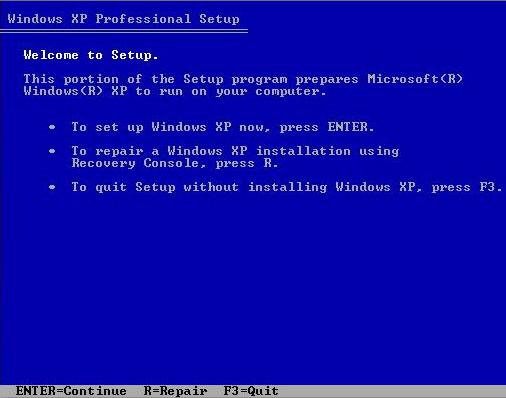 |
To install just press ENTER bouton on your keyboard. You can repair your Windows xp by using the second option on this screen (to repair a Windows XP installation using Recovery Console , press R.) |
5th
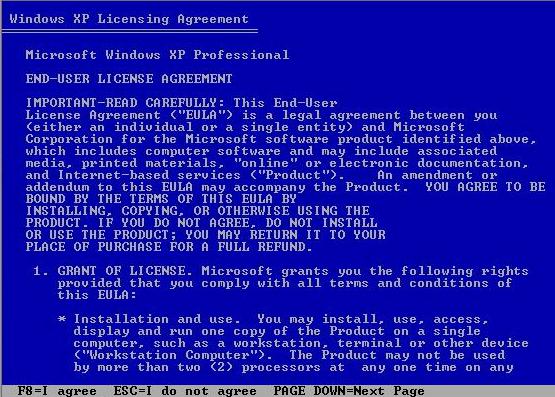 |
Just press F8 bouton (its at top of your keyboard) on your keyboard to accept Licensing Agreement. So you can continue your installation or else, you cant. |
click here to see others images